

Understanding estimates
Read a BuildX cost range, see what quality levels and location factors change, and compare contractor bids against it.
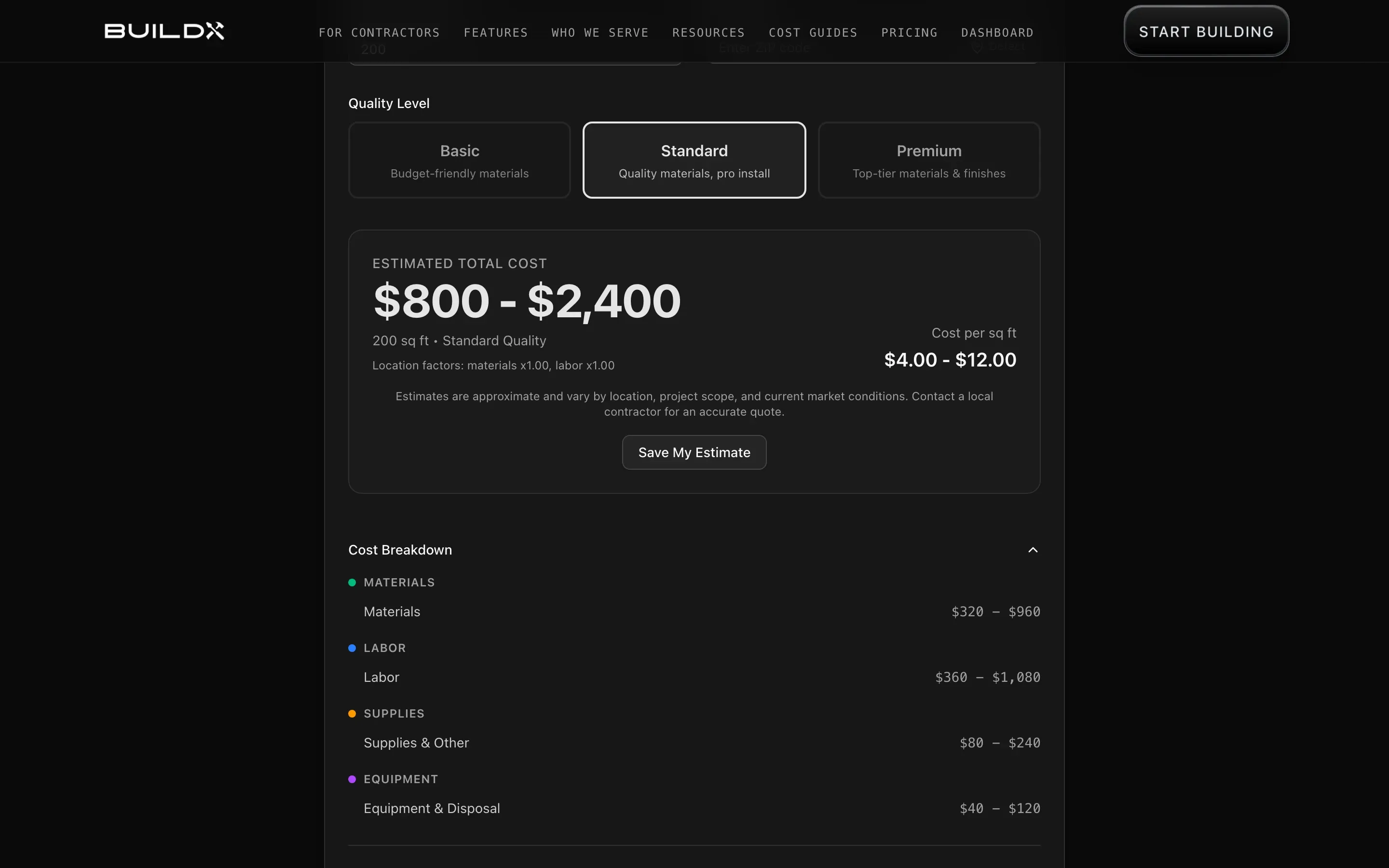
This page explains how to read the estimate on a buildx.pro calculator or in BuildX Pro, and how to use it when contractor bids come in. It’s for anyone planning a project; no account is needed.
What you can do
- Read the low and high ends of the Estimated Total Cost range.
- See how Basic, Standard, and Premium change the price.
- Check the Location factors for your ZIP area.
- Use What’s Included and What’s NOT Included to line up scope with a bid.
Read the range
The total is a range, not one number. Every line in the Cost Breakdown has its own low and high price per unit. The calculator multiplies each by the quantity it needs (most lines scale with your project size; some are one-time charges for the job), your quality level, and your location factor, then adds the lines. The low end is the sum of all the low prices; the high end is the sum of all the high prices.
What that means for you:
- A bid near the low end is possible, but it assumes every part of the job comes in cheap.
- A bid near the high end is normal for harder jobs or pricier contractors.
- A bid far outside the range is worth a question. Ask the contractor which part of the job costs more or less, and why.
Quality levels
| Level | What it means | Effect on price |
|---|---|---|
| Basic | Budget-friendly materials | 0.85 times Standard |
| Standard | Quality materials, pro install | Baseline |
| Premium | Top-tier materials and finishes | 1.25 times Standard |
The quality level scales every line, labor included. If the price is too high, try a lower quality level before you cut scope. BuildX Pro labels the same three levels Economy, Standard, and Premium.
Location factors
Under the total, “Location factors: materials x1.04, labor x0.89” (for example) shows how your area compares to the national average. Labor lines use the labor factor. Materials, supplies, and equipment use the materials factor. A factor below 1 means cheaper than average. See Regional pricing for property owners.
What’s included and what isn’t
Open What’s Included, What’s NOT Included, and Assumptions before you compare a bid. If a contractor’s bid covers work on the NOT list (removing old flooring, for example), their total should be higher than the range.
The calculator never includes:
- Permits and inspection fees
- Allowances for items you haven’t picked yet
Disposal is folded into the Equipment & Disposal line rather than priced on its own, so ask each contractor what their hauling or dumpster cost is.
Compare contractor bids to the estimate
- Give each contractor the same scope: size, quality level, and what’s included.
- Ask for an itemized bid, so you can match their lines to Materials and Labor in the breakdown.
- Check what each bid leaves out. A low bid often skips something.
- Ask each contractor how they handle allowances (budgets for items you’ll pick later, like fixtures or tile) and change orders (price changes when the scope changes). BuildX doesn’t track allowances as a line type, so get the answer in writing from your contractor. Change orders are their own records your contractor can send you.
- Compare the license, reviews, and photos on their Contractors Near Me profiles, not only the price.
Good to know
- The estimate doesn’t see your site. Hidden damage, access problems, or old wiring can move a real bid.
- If you think a number is wrong, report it. See Calculator accuracy.